Free Social Media QR code generator
Increase your social media presence by easily sharing your profiles; with just one scan, you allow more people to discover all your content.
What is a Social Media QR Code?
ZodQR's Social Media QR code is a free dynamic QR code solution to share multiple social media links of yours or your brand in a single mobile-friendly page, where all links are displays.
What information can I display on a Social Media QR Code?
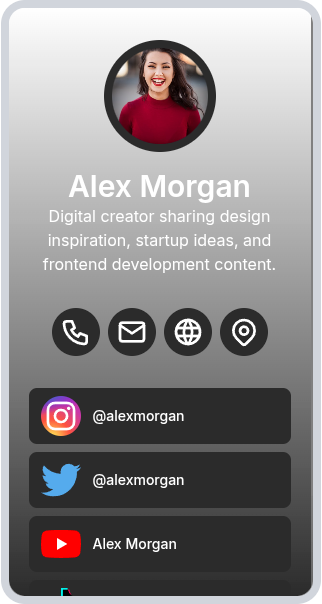
When generating Social Media QR code with ZodQR, you will have a mobile-friendly page with following elements:
- A photo of you or your brand
- Title and description: that can be your name and information about yourself, or your brandname and its short introduction.
- Contact information: phone number button (make a call), email button (open the your mail handler) your website link (open the link), and address button (open Google Maps)
- Links to your social medias, each with social icon and title
Why ZodQR is the best free Social Media QR code generator?
- No paid subscription required: with ZodQR, you can generate Social Media QR code, keep it active forever without paying for monthly subscription.
- Customizable QR code: custom QR code color, shape, and add logo to your QR code is totally free with ZodQR.
- Advanced QR code features available for free: set password, schedule or set scan limit for your QR. You can also add tags or place your new QR in a folder for better management.
- QR code will never expire: QR code generated with ZodQR will never expire, even if you are in the Free forever plan.
- Full-suite QR code solutions: ZodQR is not only a Social Media QR code generator. We have 30+ QR code solutions for all business purpose, and all free to create.
How to create a Social Media QR code with ZodQR?
Creating a Social Media QR code is free and easy with ZodQR. In just a few steps, you can add your photo, contact details, and social links to a mobile-friendly page.
- Sign up for a free forever account.
- Open the Dashboard and select Create QR Code > Social media.
- Enter your content, including a photo, title, description, contact info, and your social media links.
- Configure your QR with password protection, scheduling, scan limits, tags, or folder placement if needed.
- Style your QR with colors, shapes, and a logo.
- Save your QR and download it.
For a detailed step-by-step guide with images, visit our Social Media QR code help page.
Questions & answers
Yes. You can create Social Media QR code for free with ZodQR. All you need is create a free forever ZodQR account.